A VMP XSite can be configured to automatically create an invoice for new orders based on your preferences. These preferences can either be set globally for all VMP XSite orders, or for specific Client Groups.
Global settings will apply to all VMP XSite orders — including all those placed by clients already in a Client Group. Then, you can change the automatic invoice settings for each Client Group specifically.
To access automatic invoice settings globally...
- Log into your Mercury Network profile here.
- At the top, click Preferences, then choose VMP XSites.
- On the left, select Configure Automatic Settings.

- Now you'll see several options in the Automatic Invoice Settings section on the right.
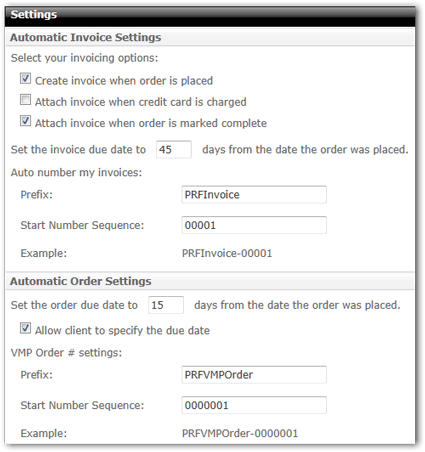
Here's what the settings do:- Select Create invoice when order is placed if an invoice should automatically be created when a new order is placed on the VMP XSite.
- Select Attach invoice when credit card is charged to automatically attach the invoice to the order when the credit card has been charged.
- Select Attach invoice when order is marked complete to automatically attach the invoice to the order when the order has been marked complete.
- Enter a number of days from which the order was placed to be used as the due date for the invoice.

The number of days considered when establishing the due date only includes business days. Weekends and major holidays will be excluded when calculating the due date. - Use the Auto number my invoices section to set the numbering prefix and the starting number for the sequence.
- In the Automatic Order Settings section, there are a few options:
- Enter a number in Set the order due date to XX dates from the date the order was placed. This automatically sets the due date for VMP XSite orders. As with the Invoice settings, only business days are used when establishing the due date.
- Check Allow client to specify the due date if you'd like your VMP XSite clients to be able to specify the due date for their orders.
- In the VMP Order # settings section, enter a prefix and a starting number to automatically be used when new VMP XSite orders are created.
To access the automatic invoice settings for a Client Group...
- Log into your Mercury Network profile here.
- At the top, click Clients.
- Now, on the toolbar, click Client Groups and choose Manage Client Groups.
- Double-click the Client Group in the list for which you'd like to configure automatic invoicing.
- At the botton of the window, you'll see the Invoicing Options section.
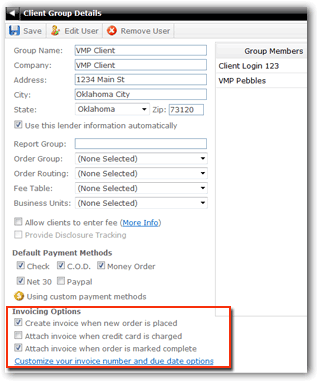
Use these settings to set your automatic options as described above. You can click Customize your invoice number and due date options to set those options for the Client Group.